
MoneyPrinterTurbo APK: use it on Android without installing an app
Updated November 3, 2026
There is no official MoneyPrinterTurbo APK or iPhone app. The open-source MoneyPrinterTurbo is a Python program for Windows, macOS and Linux. To make MoneyPrinterTurbo videos on a phone, open moneyprinterturbo.app in Chrome or Safari: you type a topic, the video renders on our servers, and you download the MP4 straight to your phone. You can add the site to your home screen so it opens like an app.
Is there an official MoneyPrinterTurbo APK?
No. The author of MoneyPrinterTurbo (harry0703 on GitHub) publishes it as source code, a pip package and a Windows one-click package. There is no Android build and no iOS build.
The reason is the workload: making a video means calling an AI model for the script, downloading stock clips, generating the voiceover and subtitles, and rendering everything with FFmpeg. That runs on a computer or a server, not inside a phone app. So the practical way to use MoneyPrinterTurbo on a phone is a website that does the heavy work on a server.
How to use MoneyPrinterTurbo on Android or iPhone
MoneyPrinterTurbo Online works in any modern mobile browser. Nothing to download, and no API keys to set up.
1Open moneyprinterturbo.app in your browser
Use Chrome on Android or Safari on iPhone. Tap Open Studio and sign in with Google or GitHub. New accounts get 60 credits, enough for a one-minute test video.
2Type your topic or paste a script
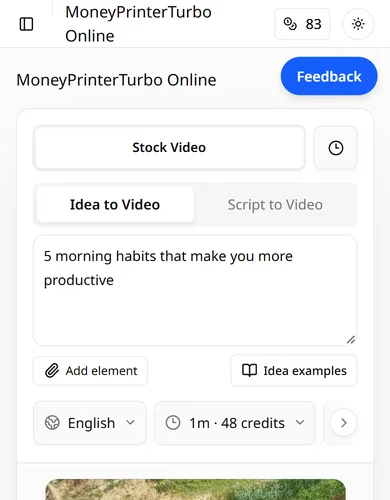
Under Idea to Video, type a topic such as "5 morning habits that make you more productive". Under Script to Video, paste your own narration instead.
3Pick the format for your platform
Choose 9:16 for TikTok, YouTube Shorts and Instagram Reels, then the language, length, voice, caption style and music. Swipe the settings row sideways to see all of them.
4Tap Generate and wait for the render
The button shows the credit cost before anything is charged. The video renders on our servers, so you can lock your phone or close the tab and come back later. Paid plans also get an email when the video is ready.
5Download the MP4 and post it
Open the queue or My Videos, tap Download video, and the MP4 is saved to your phone. Upload it to TikTok, YouTube Shorts or Instagram like any other video.
6Optional: add it to your home screen
In Chrome, open the menu and tap Add to Home screen (or Install app). In Safari, tap Share, then Add to Home Screen. It then opens full screen from an icon, like an app, with no APK involved.
What about APK download sites and app-store apps?
Search results for "MoneyPrinterTurbo APK" or "download" show a few things that are easy to mix up:
- SourceForge and Uptodown list MoneyPrinterTurbo, but what they host is the Windows package or a mirror of the GitHub code, not an Android app.
- An App Store app called "Money Printer Turbo" is published by a different developer (Sergey Fonov). It is not made by harry0703 or by MoneyPrinterTurbo Online.
- Any .apk file that claims to be MoneyPrinterTurbo is unofficial. Unknown APKs can carry malware, and some ask for API keys or logins. Do not install them, and never paste your OpenAI or other API keys into one.
Your options on a phone, compared
| Option | Works on a phone? | Setup | Cost |
|---|---|---|---|
| MoneyPrinterTurbo Online in the browser | Yes, Android and iPhone | Sign in, nothing to install | 60 free credits, then plans from $19/month |
| GitHub version in Google Colab | Barely: the notebook UI is hard to use on a small screen | Google account plus your own API keys | Free software, you pay your API usage |
| GitHub version on a computer | No, you watch the result on the computer | Python or Docker, API keys | Free software, you pay your API usage |
| Unofficial APK | Unknown, not from the author | Risky | Not recommended |
What the videos look like
These vertical videos were made with MoneyPrinterTurbo Online from a one-line topic: script, stock footage, AI voice, captions and music in one render.
MoneyPrinterTurbo APK FAQ
Can I download MoneyPrinterTurbo for Android?
There is no Android app or official APK. Use moneyprinterturbo.app in Chrome instead; you can add it to your home screen so it opens like an app.
Is there a MoneyPrinterTurbo app for iPhone?
No official one. The "Money Printer Turbo" app in the App Store comes from an unrelated developer. On iPhone, open moneyprinterturbo.app in Safari and use Share, Add to Home Screen.
Can I run the GitHub version on Android with Termux?
It is not supported. The project targets Windows, macOS and Linux with Python 3.11, FFmpeg and video rendering, which is slow and fragile on a phone even when it installs. A hosted version is the practical route.
Do I need to keep the browser open while the video renders?
No. Rendering happens on our servers. Close the tab and come back to My Videos later to download it.
Is MoneyPrinterTurbo free on mobile?
New accounts get 60 credits, about one minute of video. After that you buy a plan from $19 a month or a one-time credit pack. The same account works on phone and computer.
Does it work on tablets and Chromebooks?
Yes. Any device with a current browser can use MoneyPrinterTurbo Online.
Make your first video from your phone
No APK, no setup, no API keys. Sign in, type a topic and download the finished video.